
Still loving OVHCloud for my dedicated server hosting, and floating IPs make it so much easier.
Ok I think I need to focus more on smaller scale articles. I'm psyching myself out thinking of all the things I should add to an article, and should focus on what I need to add.
My hosting history with OVH
Here's the current situation: I use ovhcloud.com to run Proxmox that I control entirely myself (i.e. a 'bare metal' server). On that host, I run Linux virtual machines for various services (Nextcloud, git repos, and this very blog just to name a few!) and they have just been rock solid for years now.
I recently decided I wanted more disk speed, and again found out that it's just helpful to peruse the offerings at least every once in awhile. While I ended up with about half the total storage (that I wasn't using anyway) I was able to move up to NVMe storage and double the RAM for the same price I was already paying before, in the same datacenter! How nice is that.
I've considered other providers and often peruse lowendtalk.com discussions, but the OVH eco line is just very difficult to beat dollar for dollar, and I have had 0 problems with my VMs having unexpected downtime. I've certainly caused my own downtime but that's another story. But seriously, where else can you get a reliable server with 32GB of RAM for $20 a month? Their pricing is just insane.
And the management tools are really great. I think on the lowest tier boxes (Kimsufi) there have occasionally been issues with the IPMI KVM, but I have since graduated to SyS and Rise-class machines; still very reasonable for what they provide.
Floating IPs make intra-datacenter VM moves trivial
While moving ~10 VMs to a new host could be rather daunting, using Proxmox as the virtualization OS makes this at least easier by making the process of adding a temporary location (i.e. the hard drive on the new server) very simple.
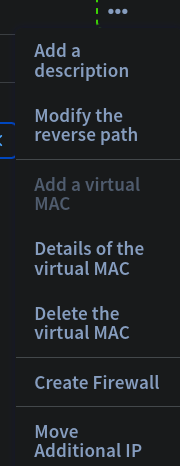
But OVH makes it even easier, as moving the IPs I have assigned from one host to another (assuming they are in the same data center of course) a matter of clicks. This is such a stress reliever; you say you want to 'move additional IP', and within a minute or two it's on the new host - because they are tied to a virtual MAC address, all you have to do is restore the VM image from backup and boot it up, and it is up and running with the same IP address. So nice.
If folks have other recommendations about their provider and making moving VM images around easy, let me know via the Fediverse (@chrisa@asty.org) or Bluesky (@asty.org).
[as always, no compensation was provided for this article, and no approval or editing was granted. I really need to add a template for this to all my articles]